
Brute force attack a BIOS with Arduino

The goal of this experiment is to convert the Arduino board into an USB keyboard plus a VGA sniffer to crack the password of a standard BIOS using the brute force attack method. There are no advantages in using this method, in fact this can be very slow and you may never find the password at all, but as always we do it for fun. It’s just a proof of concept, there are many ways of resetting a BIOS specially if you have access to the hardware, and you need it anyway because we’re talking about BIOS and there is no “remote access” as far as I know.
In theory, you can use it with other programs also not only a BIOS setup, but there must be some special conditions, for example the software must be one of those that doesn’t block after a few failed password entry attempts.
Also one of the main limitations is that we cannot read the whole VGA frame and process it, instead we read one single pixel from (more or less) the middle of the screen, and according to its color we go through the different steps, for example: a red pixel in the middle of the screen may indicate that the password is wrong in a regular BIOS setup, while a blue pixel can indicate that it is ready to receive the next password.
USB Keyboard Emulator
For the USB keyboard part, I’ve used the V-USB for Arduino code, which in turns uses V-USB library. You will need to install the V-USB for Arduino to make the “pde” work.
Circuit
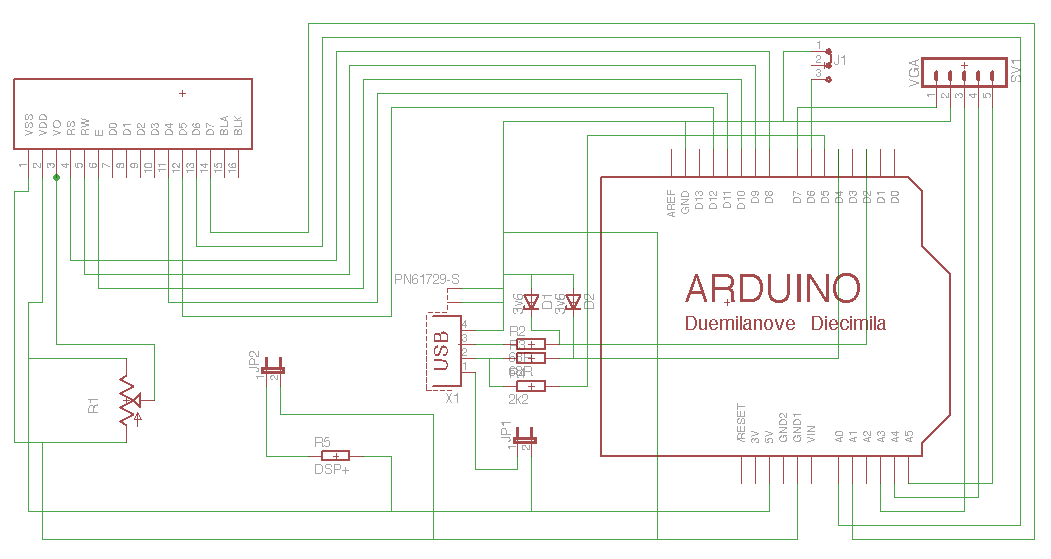
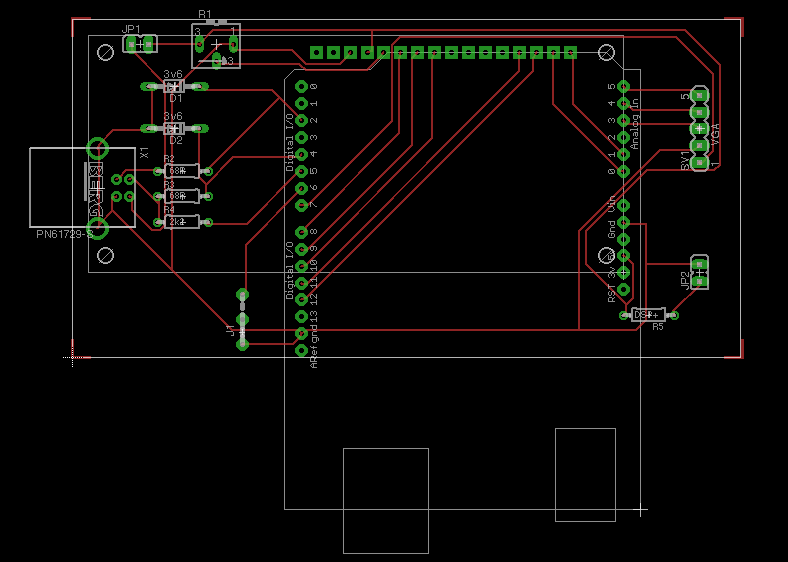
The Arduino shield for this project is pretty simple, I’ve attached a regular LCD module to have an output to avoid a second computer just to see the progress or result.
A couple of Zener diodes to make the USB keyboard interface (it’s one of the four options suggested in the V-USB Readme, here is a link to another project that uses this method also).
There is a button which is used to pause/continue the attack. If you keep the button pressed for more than 2 seconds, the attack will be reset.
Sniff the VGA
To know the color of the pixel in the middle of the screen, we need to read the analog Red signal, and also the vertical and horizontal synch pulses to know when to read the Red. The first attempt was using Arduino’s attachInterrupt to capture the HSYNC and VSYNC but the overhead made the USB keyboard to stop working.
The ISR() and SIGNAL() macros seems to work better in this case, so the VSYNC pulse will reset a global variable called h_line while the HSYNC will increment it to know in which line is the VGA frame being drawn.
Our waitWrongPassword function does the analysis of the pixel. It waits for a few seconds to appear the red pixel, and keeps looking at the line counter so when it is in the #238 (almost the vertical middle in an 640×480 resolution) it will delay a little bit to get the horizontal middle timing, and read the analog input.
Then, after reading the red analog input the result is compared to see if the ‘wrong password’ dialog is popped, I’m talking about the if (valueR > 140). You will probably need to change this value, according to your VGA card levels.
Code
You need to define the character set that you want to use for the attack. To do this, modify the charset array adding the USB key codes you want to use. We only have KEY_A, KEY_B, KEY_C by default in the example code. Also, you need to modify a second array called charset_log which must have the same size, but instead of the key code it reflects the printable byte, for logging purposes.
The other thing you need to change is the maximum length of the password, by default set to 4. Look for the MAX_LEN define.
The state is periodically saved in the EEPROM so in case of power failure, you can continue from the last (or near the last) tested password.
Here some pictures of the shield


Feel free to modify it if you need.
Bye!
Comments